
Tourism Levy
The Tourism Levy is a special tax that applies to certain tourism-related sales. This guide explains how to activate and configure the tourism levy in REVPOS.
When to Activate Tourism Levy
You should activate the tourism levy if your business:
- Operates in the tourism industry
- Provides accommodation services (hotels, lodges, guest houses)
- Offers tour and travel services
- Provides tourism-related activities
- Is required by MRA to collect tourism levy
Activating Tourism Levy
Step 1: Access Settings Dashboard
From the home page, press the green settings button to access the settings dashboard.
Step 2: Navigate to Configurations
- Scroll down in the settings dashboard
- Locate and click on the “Configurations” option
Step 3: Activate Tourism Levy
You will be redirected to the configurations screen where you can see the Tourism Levy option.
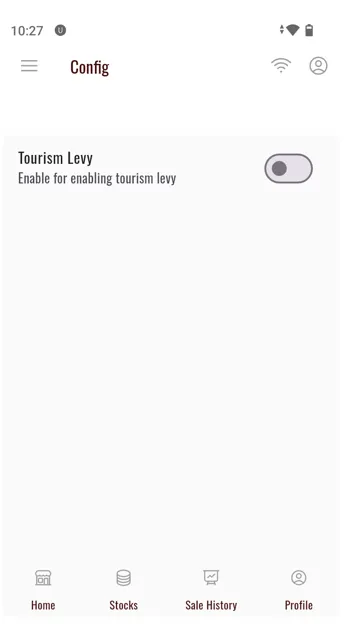
- Locate the Tourism Levy toggle or option
- Tap on the option to activate the tourism levy
- The setting will be enabled for your terminal
How Tourism Levy Works
Automatic Calculation
Once activated, the tourism levy will be:
- Automatically added to applicable sales
- Calculated based on MRA rates
- Shown separately on invoices
- Included in reports sent to MRA
On Invoices
When tourism levy is active:
- The levy appears as a separate line item
- Shows the levy rate and amount
- Adds to the total amount due
- Is clearly identified for customer transparency
Example Invoice Breakdown
Subtotal:           K 10,000.00
VAT (16.5%):        K  1,650.00
Tourism Levy (x%):  K    xxx.00
--------------------------------
Total:              K 11,xxx.00
Managing Tourism Levy
Verify Activation
To confirm tourism levy is active:
- Make a test sale
- Check the invoice for tourism levy line item
- Verify the levy amount is correct
- Confirm it appears in sales reports
Update Levy Rates
Tourism levy rates are updated automatically when you perform daily terminal configuration.
Deactivate Tourism Levy
If you need to deactivate the tourism levy:
- Return to Settings → Configurations
- Tap the tourism levy option again to toggle it off
- Confirm the change
Reporting
Tourism Levy in Reports
Tourism levy collections are included in:
- Daily sales reports
- Tax reports sent to MRA
- Financial summaries
- End-of-day reconciliations
Compliance
The REVPOS system automatically:
- Tracks all tourism levy collections
- Includes levy data in MRA submissions
- Maintains records for audit purposes
- Generates required compliance reports
Troubleshooting
Tourism Levy Not Showing on Invoice
Problem: Levy activated but not appearing on sales
Solutions:
- Verify activation in Configurations
- Run terminal configuration to update settings
- Check if specific items are levy-exempt
- Restart the application
- Contact support if issue persists
Incorrect Levy Amount
Problem: Tourism levy calculation seems wrong
Solutions:
- Perform daily terminal configuration to get latest rates
- Verify the MRA-specified levy rate for your business
- Check if there have been recent rate changes
- Review the sale total and calculation breakdown
- Contact MRA or support for rate verification
Cannot Activate Levy
Problem: Unable to toggle tourism levy on
Solutions:
- Ensure terminal is properly activated
- Check if your terminal is registered for tourism levy collection
- Verify with MRA that your business should collect levy
- Update terminal configuration
- Contact administrator or support
Best Practices
Rate Information
Tourism levy rates are set by MRA and may vary based on:
- Type of tourism service
- Location of business
- Size of establishment
- Specific regulations
Quick Reference
| Task | Location | Steps |
|---|---|---|
| Activate Levy | Settings → Configurations | Toggle tourism levy on |
| Verify Activation | Make test sale | Check invoice for levy line |
| Update Rates | Settings → Terminal Status | Get Config |
| Deactivate | Settings → Configurations | Toggle tourism levy off |
Support and Resources
Need Help?
If you have questions about tourism levy:
- MRA Support: Contact Malawi Revenue Authority
- System Support: Axis Solutions
- Documentation: Review MRA tourism levy guidelines
- Training: Attend MRA training sessions
Additional Resources
- MRA Tourism Levy Guidelines
- REVPOS User Manual
- Terminal Configuration Guide
- Sales and Invoicing Guide
Summary
You have now learned how to:
- Activate tourism levy in REVPOS
- Understand how levy is calculated and applied
- Verify levy on invoices
- Maintain compliance with MRA requirements